7. Description of Sheets
7.1. Main
Set the model path, reload model data to memory, and select active countries for querying
Model Folder path of the MESSAGE model to be connected to the SPLAT interface
Main Region name of the MESSAGE model to be connected to the SPLAT interface
Region Active? list of sub-regions (countries) to be loaded into memory
Scenarios to Load list of currently specified scenarios in the main region, and to specify the scenarios to be loaded into memory
Country Name country codes in the MESSAGE model
Description country names expanded
Power Pool the powerpool a country belongs to
TimeSlices/Load Regions number of time slices modelled per year
# Demands number of demand components
# Technologies number of technologies in country
# Constraints number of constraints in country
Scenarios name of scenarios
Discount Rate discount rate of technologies
import model data stored in adb and ldb files into memory, perform various calculations.
refresh data sheets (yellow sheets) for reloaded subregions and scenarios
save all model (adb and ldb) files using excel-SPLAT formatting for selected subregions (use this after making a change with MESSAGE interface) If this button is pressed the MAINa ldb files will also be updated if MAINa is selected, to exclude interconnectors for subregions that are not selected below.
7.2. Input Sheets
This section contains the list of parameters (along with parameter code, their unit and definitions) present in each input sheet in the SPLAT interface.
Note
The parameter values refer to the value of the parameter for the given country for the given scenario for the given year(s).
Time series data can sometimes be inserted for small number of years and SPLAT will interpolate it linearly for missing years.
All costs must be given in common base year (e.g. CMP model adopted 2019 base year.)
7.2.1. Demand
Parameter |
Unit |
Definition |
|---|---|---|
SentOut Demand |
GWh |
Demand seen by central generation before entering transmission and distribution grid. |
7.2.2. PeakDemand
Parameter |
Unit |
Definition |
|---|---|---|
SentOut Peak Demand |
MW |
The aggregate peak demand of the country for the specific year. Sectoral final electricity demand can also be entered. |
7.2.3. Transmission and Distribution
The transmission and distribution sheets are used to review or modify transmission and distribution technologies parameters as per the definitions in the TechnologySets sheet (see section below).
Note
If the user wants to model with “sent-out” demand (see demand), transmission efficiency must be set to 100%, and investment costs set to a small value. In the default configuration there is no distribution technology specified for “Sent-out” electricity.
If a user specifies values both in the Constant column, as well as under milestone year columns, only the constant value will be used to update the MESSAGE model and the other values will be ignored.
Parameter |
Unit |
Definition |
|---|---|---|
Efficiency |
% |
Efficiency of the transmission or distribution system. |
Overnight Cost |
$/kW |
The cost of a construction project if no interest was incurred during construction, as if the project was completed “overnight”. Values are given in constant prices of base year. |
Fixed O&M Cost |
$/kW |
Annual fixed operating and maintenance cost in prices of base year. |
Note
For distribution, values need to be entered for urban, rural, industry and commerce distribution types.
7.2.4. FuelPrices
Parameter |
Unit |
Definition |
|---|---|---|
Variable Cost |
$/GJ |
Refers to the price of the given fuel or resource. Variable cost for supply of wind, solar and hydro, and extraction of bagasse are set as zero. |
7.2.5. GenericTech and SpecificTech
The GenericTech sheet displays generic technology parameters.
The SpecificTech sheet is used to review and update site specific power generation technology parameters that are constant over time.
The SpecificTech sheet has an extra button: , which allows the user to add new site specific technology to the MESSAGE model that is linked.
Currently this action makes the addition by copying the technology parameters of a generic technology of the same technology type as specified by the first 6 characters in the technology name. A new technology will be automatically added to all active scenarios. A MESSAGE technology code is created automatically based on the input and output commodities (as specified by the associated generic technology) and the already existing technologies having the same inputs and outputs.
Once a new technology is added, its parameters must be updated using the button.
Parameter |
Parameter Code |
Unit |
Definition |
|---|---|---|---|
Input/Fuel |
Par_minp |
The fuel that is consumed by a technology and it’s level in the energy system. e.g., Gas/Primary is the input fuel for gas co-fired technology. |
|
Output |
Par_moutp-ef |
The output of the given technology. e.g., Electricity/Secondary is the output of gas co-fired technology. |
|
Minimum utilization rate |
Par_minutil |
Fraction of time in a year the technology must be used/dispatched. The value ranges between 0 and 1, and is 0 for most technologies. |
|
First year |
Par_fyear |
First year in which the technology can be built in the future. |
|
Life |
Par_pll |
year |
Operational life of the technology. |
Efficiency |
Par_moutp |
% |
Output to input ratio of the given technology. |
Plant factor |
Par_plf |
A technology has a profile if one of its inputs/outputs has a profile. If a technology has profile (e.g., hydropower), plant factor is the maximum availability of a technology in each load region. If the technology has no profile, plant factor is the maximum availability of a technology per year. The availability gets scaled by plant factor. Leave equal to 1 or blank to use availability as specified by profile. |
|
Operation time |
Par_optm |
Fraction of time in a year the technology can be in operation. |
|
Plant Status** |
Par_status |
Can be existing, committed or candidate depending on the status of the plant. |
|
hist.string** |
Par_hisc |
year1 MW1 year2 MW2 |
Year of installation of the technology, and its capacity at the time. If a plant is installed over multiple years in different steps, it can be specified as year1 MW1 and year2 MW2 for unit1 and unit2 respectively. |
Total Capacity Upper Limit** |
Par_bdi_up |
Total capacity upper limit of the technology throughout its lifetime. |
|
Load Curve** |
This is not an input parameter, but a flag to indicate whether a load profile (or curve) is associated with this Technology. 1 = yes, 0 = no. |
Note
The profiles/load curves are calculated by SPLAT based on the hourly values (8760) present in *.tit file in data folder. They are stored in the adb, ldb and ldr files. The reason for not having them in the spreadsheet is that they vary depending on the load region/timeslice definition (e.g. large model/small model) and are would be very difficult to manage effectively in a spreadsheet.
** Parameters relevant to
SpecificTechsheet only.
7.2.6. GenericTechCosts and SpecificTechCosts
These sheets display the cost parameters that are either constant or change over the model horizon.
Parameter |
Unit |
Definition |
|---|---|---|
Overnight Investment Cost |
$/kW |
Overnight costs in constant prices of base year. |
Fixed O&M Cost |
$/kW |
Fixed operation and maintenace cost for the given technology. |
Variable O&M Cost |
$/MWh |
Variable operation and maintenance cost for the given technology. |
7.2.7. SpecificTechHydroDams
The approach to define hydro dam technologies in SPLAT is given in Hydro Dam section. The parameters used to define them are given below:
Parameter |
Parameter Code |
Unit |
Definition |
|---|---|---|---|
Description |
Par_Descr1 |
Description of dam hydropower technology. This does not affect any SPLAT functionalities. |
|
Corresponding River Tech |
Par_river_tech |
Technology code: {CountryCode}RIDM_{ProjectName}} |
|
River Capacity Max Flow |
Par_bdi_up_R |
MW |
This is a total capacity limit for the corresponding river technology to define the river’s max flow in MW derived from max flows in m3/s. |
Dam Storage Constraint Long Name |
Par_storage_con |
Technology code: D_{CountryCode}HYDM_{ProjectName} |
|
Dam Storage Constraint Short Name |
Named as D001, D002, and so on based on dam hydropower technologies in the country. |
||
Available dam storage capacity |
Par_storage_up |
MWyr |
Storage volume that can be used by the power plant in energy terms. This value in MWyr is derived from the reservoir size (million m3), the energy per unit volume (MJ/m3) and an assumption around minimum volume for reservoir unless this information is available. |
River-storage coefficient |
Par_river_coef |
This is the coefficient for the storage associated with this power plant. +1 means that Each MWyr (or GJ) that flows out of the River Technology will increment the storage level by 1 MWyr or 1 GJ |
|
Storage-PP coefficient |
Par_stor_coef |
This is the coefficient for the storage associated with this power plant. -1 means that Each MWyr (or GJ) that flows out of the PP Technology will decrease the storage level by 1 MWyr or 1 GJ |
7.2.8. Battery&PumpStorage
The approach to define battery and pump storage technologies in SPLAT excel interface is given in Batteries and Pump Storage section.
In the SPLAT MESSAGE modelling framework, the battery storage technologies are modelled as generic technologies, unless there are any existing or committed projects.
The pumped hydro storage technologies are modelled as non-generic technologies.
The storage capacity in terms of MW is based on the result of the optimization process (the total capacity upper limit can be defined in SpecificTech sheet), while the hours of storage already needs to be defined for each technology.
For each storage technology, there is a corresponding proxy technology created automatically by the MESSAGE modelling framework to write the equations. The parameters used to define them are given below:
Parameter |
Parameter Code |
Unit |
Definition |
|---|---|---|---|
Description |
Par_descr1 |
Includes technology name (Battery Storage or Pump Storage) and storage hours. |
|
Corresponding Proxy Tech |
Technology code: {CountryCode}ELPT{StorageHours} for battery storage and {CountryCode}. ELPTPS for pump storage. The proxy technologies are created automatically by MESSAGE framework to write equations |
||
Hours of storage |
Par_hrs |
hours |
Storage hours offered by the techniology. |
Storage efficiency |
Par_moutp |
% |
Ratio of energy output by the system to the energy input to the system. |
RelationSSLongName |
Technology code: SS_{CountryCode}{StorageTechnologyCode}. Storage technology code is ELPT for battery storage and ELPTPS for pump storage. |
||
RelationSSShortName |
Named as SS01, SS02, and so on based on storage technologies available in the country. |
||
Proxy Capacity Constraint Long Name |
Technology code: PC_{CountryCode}{StorageTechnologyCode} |
||
Proxy Capacity Constraint Short Name |
Named as PC01, PC02, and so on based on storage technologies available in the country. |
||
Rel.SS-Proxy Constraint Long Name |
Technology code: PS_{CountryCode}{StorageTechnologyCode} |
||
Rel.SS-Proxy Constraint Short Name |
Named as PS01, PS02, and so on based on storage technologies available in the country. |
||
ST_Act.1.-SS Coefficient |
Used in balance equation. -1 in Activity 1refers that the technology will take 1 unit of energy from the system. |
||
ST_Act.2.-SS Coefficient |
Same as cycle efficiency. Used in balance equation. 0.9 in Activity 2 refers that 0.9 unit of energy from the system will be stored by the technology. |
||
ST_Cap-PC Coefficient |
Storage technology contribution to reserve margin. |
||
PT_Cap-PC Coefficient |
Default value for proxy technology. |
||
PT_Act.1.-PS Coefficient |
Default value for proxy technology. |
||
SS-PS Coefficient |
Default value for proxy technology. |
7.2.9. Interconnectors
The interconnectors sheet is used to review and update cross-border interconnector parameters. At a minimum the two interconnecting countries (which must be active) must be specified to view the interconnections between them.
Parameter |
Parameter Code |
Unit |
Definition |
|---|---|---|---|
Desciption |
Par_Descr1 |
List of possible interconnectors between country 1 and country 2 in the model. |
|
First Year |
Par_fyear |
First year in which the technology can be built in the future. |
|
Efficiency |
Par_moutp |
Efficiency of transmission. Assumed 95% or above. |
|
Total Capacity Upper Limit |
Par_bdi_up |
Maximum possible installed transfer capacity of the interconnectors. |
|
hist.string |
Par_hisc |
Year of installation of the technology, and its capacity at the time. |
|
Overnight Cost |
Par_inv |
$/kW |
Overnight costs in constant prices of base year. |
7.2.10. SpecificCapacityLimits and InterconnectorsCapLimits
Parameter |
Unit |
Definition |
|---|---|---|
New capacity fixed limit |
MW |
Fixed limit on new capacity addition of the technology. Same as bdc_fx. |
New capacity lower limit |
MW |
Minimum new capacity addition of the technology. Same as bdc_lo. |
New capacity upper limit |
MW |
Maximum new capacity addition of the technology. Same as bdc_up. |
Total capacity fixed limit |
MW |
Fixed limit on total installed capacity of the technology. Same as bdi_fx. |
Total capacity lower limit |
MW |
Minimum total installed capacity of the technology. Same as bdi_lo. |
Total Capacity Upper Limit |
MW |
Maximum total installed capacity of the technology. Same as bdi_up. |
7.2.11. PVZones, WindZones, OffshoreWindZones, CSP6hrZones and CSP12hrZones
The approach to define VRE technologies (solar PV, CSP, onshore and offshore wind) is given in Solar PV, CSP, onshore and offshore Wind section. The parameters needed to define VRE zones are stated in the table below:
Parameter |
Parameter Code |
Unit |
Definition |
|---|---|---|---|
Description |
Par_descr1 |
Name of PV or Wind Zones within the country. |
|
Total Capacity Upper Limit |
Par_bdi_up |
MW |
Maximum possible installed capacity of the VRE technology within the given zone based on MSR work. |
Latitude |
Par_lat |
degree |
Latitude of the given VRE zone. |
Longitude |
Par_long |
degree |
Longitude of the given VRE zone. |
Offset Investment (connection to road+grid) extension |
Par_offsetinv |
$/kW |
Offset investment to account for connection to road and grid extension for the VRE zones. SPLAT will add that value to what ever value is currently stored for investment cost “inv” with that technology. |
Multiplier Investment (according to turbine class) |
Par_multinv |
factor |
Factor to scale investment cost for onshore wind technologies. |
Note
Latitute and Longitude data can be stored in the adb files together with the rest of the model input data. It is not used by SPLAT or MESSAGE for anything, but it can be used by results viewers for display on maps (e.g. in Tableau).
For offset investment and multiplier investment parameters, one has to remember to use the pull down option “Reset Investment” in cell F6, when generic costs are updated for whatever reason, or before an update was made in raw MSR data, before re-applying the “Offset Investment”.
The multiplier investment (according to turbine class) parameter is in
WindZonessheet only. This categorization doesn’t apply to offshore as it is assumed all offshore wind turbines are of the same class.
7.3. Constraint Sheets
Constraints are linear mathematical equations applicable across several technologies (power plants, storage, transmission, etc. These are user-defined relations to guide a model based on scenario narratives. In MESSAGE, a constraint is defined as a sum-product of a coefficient and variable with user-defined upper or lower limits as shown below:
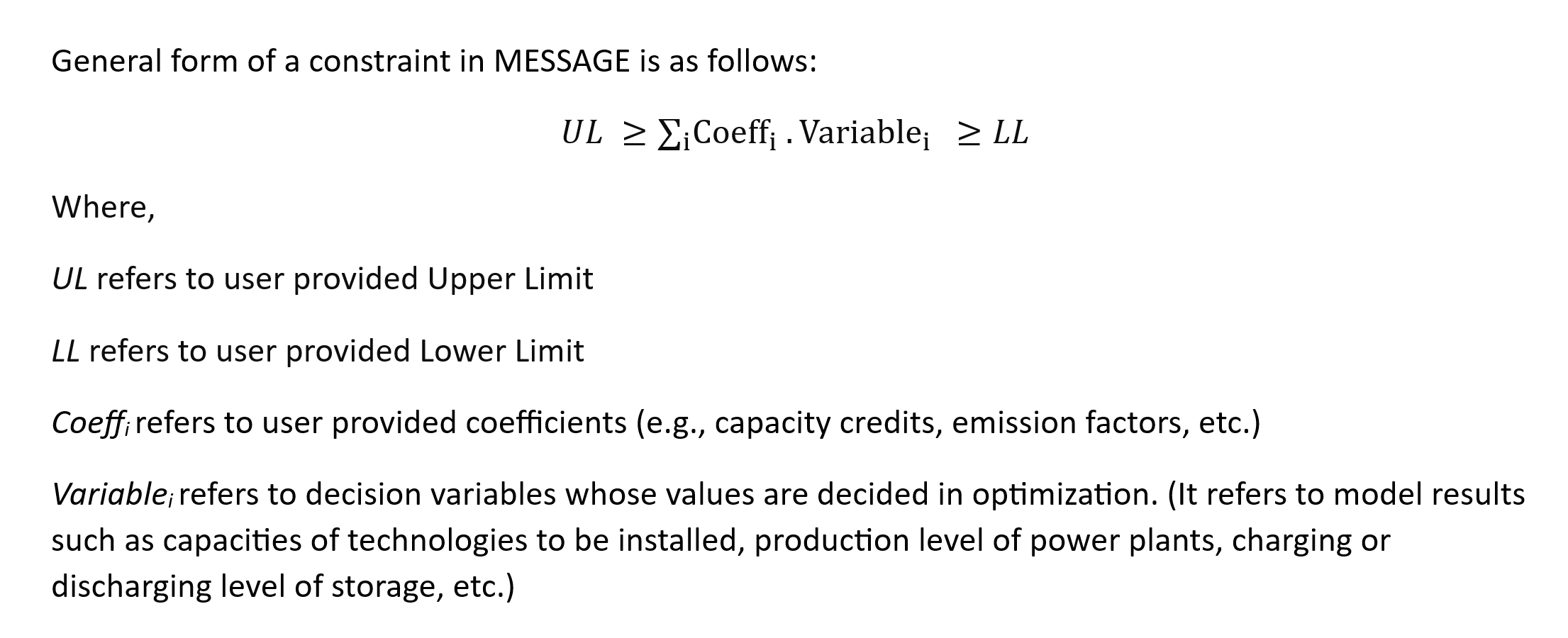
This section describes the different constraints (including their equations and parameters) present in different Constraint sheets in SPLAT.
7.3.1. ConstraintList
This sheet contains the list of all the constraints in the model which are defined in the following sheets.
7.3.2. PVAnnualBuildLim and WindAnnualBuildLim
These two sheets are used to set annual build limits for solar PV and wind onshore respectively. The equation(s) used in the sheet is as given below:
\(\sum\limits_{PV}New\, Capacity\, in\, year\, t_{PV} <= PVBR\, in\, year\, t\)
\(\sum\limits_{Wind}New\, Capacity\, in\, year\, t_{Wind} <= WindBR\, in\, year\, t\)
The equation suggests that the new installed capacity of solar PV or wind for year t should be below the build rates defined in this sheet.
The parameters used in this sheet are as follows:
Parameter |
Parameter Code |
Unit |
Definition |
|---|---|---|---|
Target (% of peak demand) |
% of peak demand |
This refers to the country target to meet certain percentage of peak demand by means of given technology. Set as a design decision/suggestion. |
|
Max |
MW |
Maximum new installed capacity limit for any country in the region. Set as design decision/suggestion. |
|
Min |
MW |
Minimum new installed capacity limit for any country in the region. Set as design decision/suggestion. |
|
Upper limit |
PVBR or WDBR |
MW |
x = Min value. y = Minimum between Max and VRE capacity target to meet the peak demand. The capacity upper limit is defined as the maximum value between x and y. |
Note
The target (% of peak demand), Min and Max values are set as design decision/suggestion. These values could be made larger or smaller. One can also make country specific coefficients by overwriting the formulas for upper limits.
7.3.3. ReserveMarginConstraint
In a power system, generation must always equal consumption. When the balance is disrupted, it can lead to outages and complete black outs. There are many events that might disturb the balance (many of them are stochastic/predictable with probability) such as planned maintenance, unplaneed stops, changes/variations in demand, and changes in supply. Therefore, reserves are needed in the system to make sure that power demand is always met.
Based on the response (reaction time), reserved can be classified as:
Primary reserves: part of operational (running) or fast to activate capacity available to immediately (in seconds) for cover for disturbances.
Secondary reserve: can be operating or cold (not operating) capacity to be activated in minutes (after initial disturbance and activation of primary reserve, secondary reserve is activated, and units are redispatched so to re-activate primary reserve capabilities.)
Tertiary reserve: these are usually back-up units that can be activated in minutes/hours to allow reactivation of secondary reserve capabilities.
In MESSAGE framework, all information about current and future power system is assumed to be known (with 100% certainty), i.e., not stochastic, therefore, production pattern decisions always have to deterministic. When modelling long term development of a power system, an analyst should make sure that the future capacity is sufficient to cover demand during critical periods (usually during peak hours) and to cover other operational needs (e.g., maintenance).
Note
There’s a lot of stochastic behavior in a real system that cannot be captured in the same way within the model.
It is possible to run analysis with various demand and supply availability patterns and model extreme operational conditions.
Reserve margin is the margin of firm capacity that is required above peak demand/load. It ranges usually between 10% to 25% of peak load. For e.g., if a region has 12 GW of firm capacity and 10 GW of peak demand, the reserve margin would be 20%.
Reserve Margin (RM) = (Firm Capacity - Peak Demand) / Peak Demand
The representation of system reserve in MESSAGE modelling framework is as shown below:
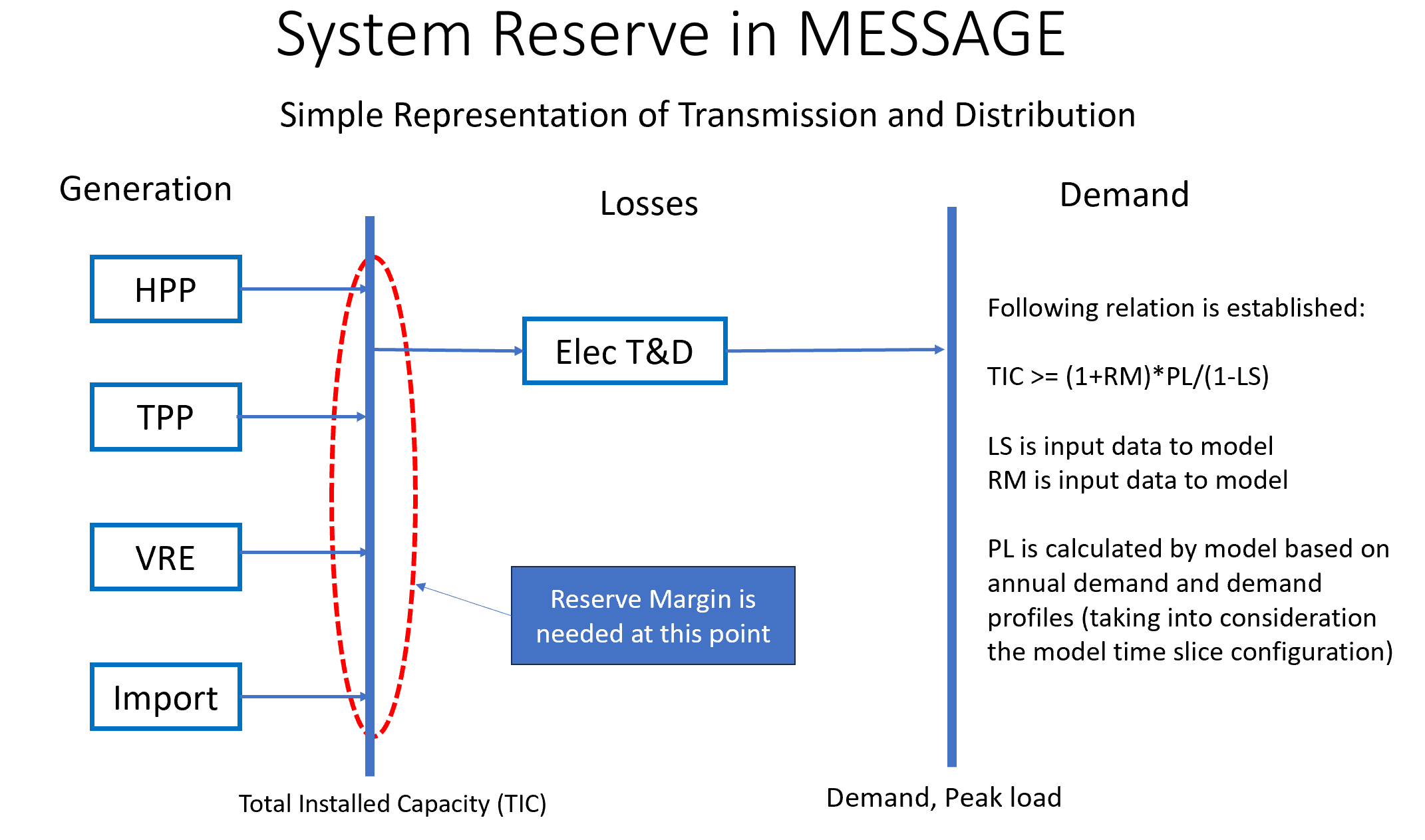
The constraint equation used in the ReserveMarginConstraint sheet is as follows:
\(\sum\limits_{PP}(CapacityCredit_{PP} \times Capacity_{PP}) - \dfrac{1+RM}{1-LS} \cdot Capacity_{Ptnd} \geq 0\)
where,
PP refers to all applicable power plants.
CapacityCredit_PP and Capacity_PP refer to capacity credit and installed capacity of power plant.
RM = Reserve Margin
Capacity_Pt&d = Size (MW) of transmission and distribution grid used as proxy of peak demand
LS = Transmission Losses
“ConCap_RM” stands for Coefficient applicable on Capacity (MW) and associated to Reserve Margin constraint.
Parameter |
Parameter Code |
Unit |
Definition |
|---|---|---|---|
RHS Reserve Margin Lower Limit |
RM |
Set as 0 by default. Minimum RM. |
|
RHS Reserve Margin Upper Limit |
Maximum RM. Since the model is solving for least cost, it will not “overbuild” without a good reason for it. We don’t want to disallow overbuild, which setting an upper limit would do. Therefore, it is kept blank. |
||
Reserve Margin |
% |
Percentage of peak demand. Used to derive capacity credit of transmission. |
|
Tx Losses (for transmission capacity credit) |
% |
Percentage of transmission losses. |
|
LHS Capacity credit |
Concap_RM |
Capacity of the technology that is allocted to provide reliable and stable power. It is measured over period of critical conditions, such as peak load. |
Note
Unlike build rate constraint, SPLAT requires the user to insert reserve margin constraint as a non time-series constraint i.e., a constant upper or lower limit applied on all years in modelling horizon.
7.3.4. LocalREConstraint
Different countries or regions can have target of achieving certain minimum share RE in the the total power generation by certain year.
In the LocalREConstraint sheet, the minimum “target” share of RE (more specifically VRE) technologies in the total power generation is set as a constraint in the model for different years.
The equation representing this constraint can be represented as follows:
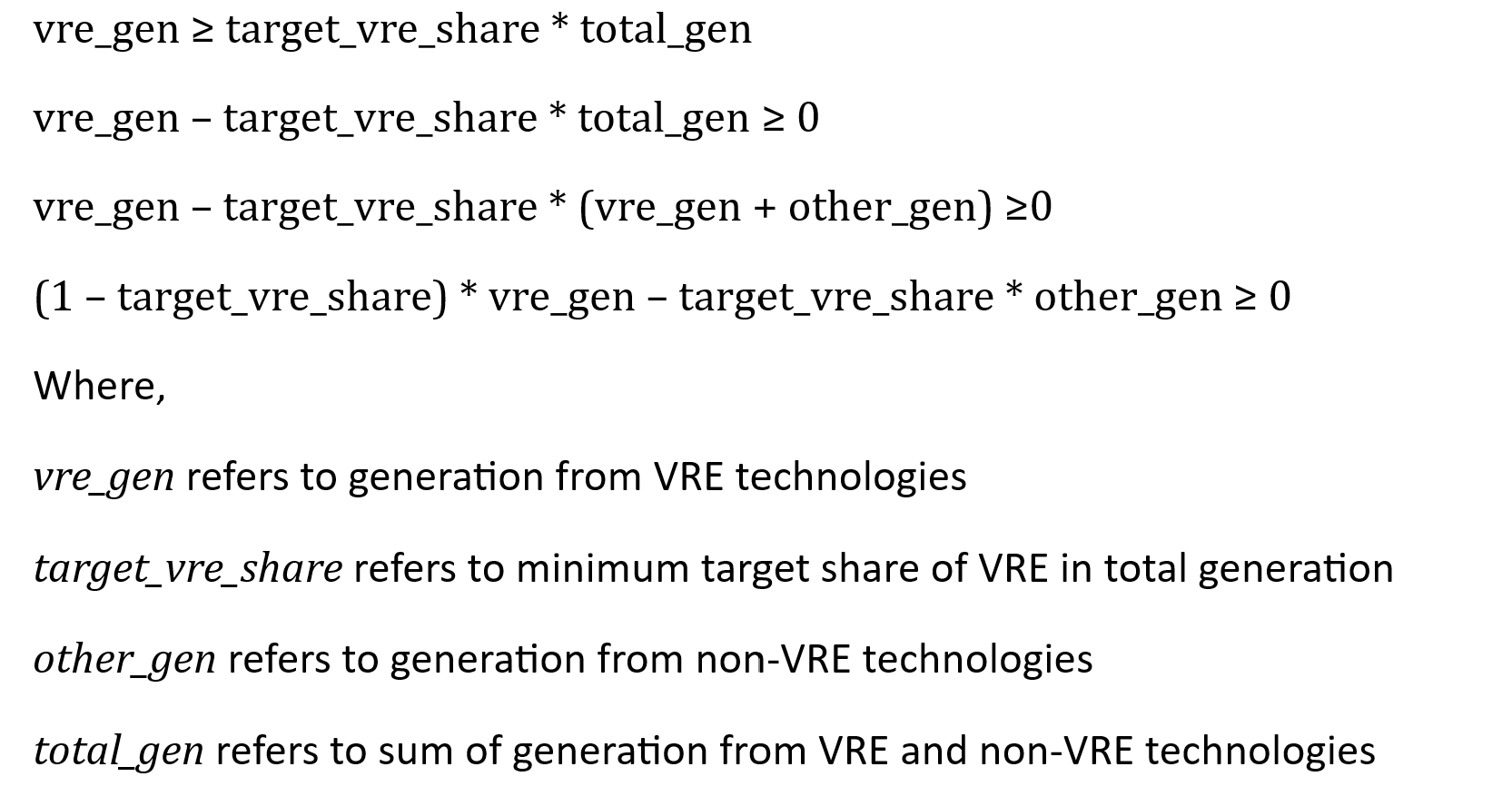
“ConAct_RE” refers to the coefficient of Activity/Generation (GWh) of a power plant technology.
Parameter |
Parameter Code |
Unit |
Definition |
|---|---|---|---|
RHS RE share lower limit |
% |
Minimum RE share in electricity supply. Set as 0 by default. |
|
RHS RE Share upper limit |
% |
Maximum RE share in electricity supply. Left blank by default. |
|
RHS RE target |
% |
RE target to meet share of electricity demand by given year. |
|
RHS Tx Losses |
% |
Percentage of transmission losses in given year. |
|
LHS ConAct_RE |
ConAct_RE |
Set to 1 for RE techs and zero for the others. Backstop is included to avoid infeasibilities in the case where there are not enough technology options to meet the target. |
|
LHS transmission |
set to -x for the transmission technology, where x is the RE target share (by energy), |
7.3.5. CO2Constraint:
The CO2 emissions constraints are set in more ambitious scenarios. In this sheet, the reduction target for CO2 emissions for different years is set relative to a specific reference scenario. This in turn sets the upper limit on the CO2 emissions from power generation from different technologies. The constraint equation used in the model is as shown below:
\(\sum\limits_{PP}CO2_{PP, t} <= MaxCO2_t\)
where,
LHS represents the sum of CO2 emissions from power sector in year t.
RHS represents the maximum limit of CO2 emissions from power sector in same year t.
Parameter |
Unit |
Definition |
|---|---|---|
Reduction target |
Target for reducing emissions from power sector relative to reference values (in columns J-N) |
|
RHS Upper Limit |
ktCO2 |
Maximum possible CO2 emissions from the power system. |
7.4. ReportGen-Annual
This sheet allows to run the model and get results in annual resolution. The steps are described in Running the model.
7.5. ReportGen-Profiles
This sheet allows to generate Sub-Annual (Profiles) results file. The steps are described in Extracting the results.
7.6. TimeSlices
Displays timeslice definitions (load regions) used in model